Entertain your kids with the navigation system

Nokia N95 running TomTom Navigator

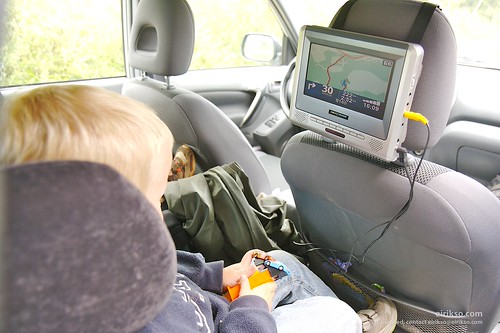
Our four year old son has been very interested in the navigation system I am running while we’re out driving. He leans over to follow it closely and it’s actually great entertainment for a little boy that sometimes finds it boring to drive for hours…

I am running TomTom Navigator on my Nokia N95. I have tried a lot of different navigation systems and TomTom is by far the best one. Everything else I’ve tried looks and handles ridiculous in comparison. A quick disclaimer here is the fact that I think It’s so amazingly good that I’ve even bought a tiny bit of shares in TomTom.

Because the N95 is equiped with video out it was fairly easy to enhance the entertainment effect of my navigation system. The video output can be used for more than utterly stupid experiments.

I simply connected it to my son’s small DVD screen. Wow! Seven inches of pure joy for the small ones in the back. Changing view, colors and the language of the navigation voice keeps them happy.

Running the navigation system for the kids

You need a Nokia with video out, a navigation system running on your nokia, a DVD system or screen for the kids with video in and a couple of cables. And some slightly geeky kids.

Nokia Video Cable
The Nokia video cable (no, you can’t use any A/V-cable)

Video Cable
The video and audio input cable for the screen.

RCA
RCA connectors to splice the two.

Connected
And there you are…

Entertain your kids with the navigation system

What I’ve been up to

Straw
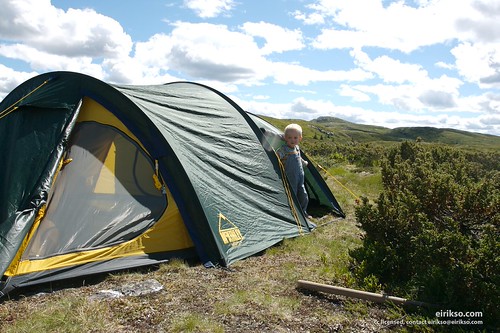
Vacation. Yes, in Norway most of us can enjoy about five weeks of vacation each year. Spending some of it during winter, but usually most during summer.

Tent
This time I’ve had fun in the mountains.

And what’s up on eirikso.com? I am working on a lot of details with my new design and my new host. But I also have a lot of interesting articles in my list of drafts. I am geeky enough to include some technology in my vacation. You can expect an article about navigation systems and how they’re excellent entertainment for your geeky kid.

Navigation
And as some of you might have noticed already. An article about my recent experiments with HDR photography.

And of course a lot more. I’m not spending hours on redesign and a a new host because this blog will be less interesting in the coming months!

What I’ve been up to

Installing reCAPTCHA on eirikso.com

reCaptcha
Everyone running a fairly popular blog knows about the problem with comment spam. To put it short, bad people polute the comment forms on blogs to spread links and commercial info about their products or web sites.

I have been using several plugins to fight the spam, but lately the preassure from the “spam bots” have increased to a level where it puts preassure on the server I am running. I don’t like to let my readers down by making it difficult to comment, but I am now forced to install a small trick to verify that it is real people and not a robot that tries to leave a comment.

I have decided to put the small piece of work you have to do when you verify yourself into a good cause by using the reCaptcha plugin to verify real humans.

A CAPTCHA is a program that can tell whether its user is a human or a computer. You’ve probably seen them — colorful images with distorted text at the bottom of Web registration forms. CAPTCHAs are used by many websites to prevent abuse from “bots,” or automated programs usually written to generate spam. No computer program can read distorted text as well as humans can, so bots cannot navigate sites protected by CAPTCHAs.

From now on you will have to write down two words from an image when leaving comments. When you do that two things happen:

1. You have verified for eirikso.com that you are human
2. You have helped digitizing a book

Yes. A good cause. You find the details here. And to put that page short:

reCAPTCHA asks commenters to read two words from a book. One of these words proves that they are a human, not a computer. The other word is a word that a computer couldn’t read. Because the user is known to be a human, the reading of that word is probably correct. So you don’t get comment spam, and the world gets books digitized. Everybody wins!

So, feel good when you put in that extra bit of work to be able to comment!

Installing reCAPTCHA on eirikso.com

Mounting your phone for time lapse photography


When you are experimenting with those time lapse tricks you might want a tip on how to mount your phone. I solved it with some aluminum foil. It can be easily formed to fit any surface and hold any phone. Simple as that. Just make sure you don’t short cut any of the connections at the bottom of your phone.

Now leave it in your window and make stuff like this.

http://flash.revver.com/player/1.0/player.swf

Mounting your phone for time lapse photography

Testing flickr

Testing flickr

It is quite easy to let flickr help you post directly to your blog from your mobile phone. This article is a simple test to see if i have managed to do the styling right. In theory this image should pop up in a lightbox when you click it. Edit: I decided not to use that fancy Lightbox effect by default. It might cause problems in some browsers.

I have added another image with the Lightbox effect here. Click it to test the effect. Should I add this effect to all images in this blog by default?

Writing

In Safari on my Mac the Close button on the lightbox image doesn’t work. I have to close it by clicking somewhere outside of the window.

Testing flickr

Up and running!

Moving eirikso
It seems like the name servers around the net have updated and that most of you now can view my new and refreshed eirikso.com

The design is based on Recycled Canvas, but heavily modified by the utterly talented Henrik Lied. Credit also goes to the always helpful Kim Erlandsen and Mr. problem fixer Trond Isaksen.

I am still running this site on WordPress. Using Flickr to publish images and Revver to publish videos.

I have also changed hosting company. I wasn’t completely satisfied with the speed and stability from Dreamhost. So I am trying out A2 Hosting. So far they seem faster and more reliable.

I still have a lot of details that need adjustment. Feel free to comment about any issues or suggestions you have regarding my new design.

Up and running!

Moving eirikso.com to a new host

I am currently working on my change of host for eirikso.com

Most likely I will change the host this evening, so expect 24 hours of potential unstability.

And please don’t post any comments before you see a new layout and a post stating that the move has finished. Any comments posted during the transition might be lost.

I am sorry for any inconvenience, but as soon as I am up and running on my new host this site should be faster and more stable than ever.

Moving eirikso.com to a new host

Time lapse with Nokia phones

Sequence Mode

The people that are lucky enough to run around with iPhones in their pockets probably wonder what to do with their old phones. Here is a suggestion. Regular readers will know that I like photographic experiments. So first, the ones that just retired their Nokia N95. It has built in time lapse photography. Something called “sequence mode”. Simply choose what kind of sequence you want, click the trigger and let the camera snap an image at the selected interval.

Sequence Mode

I did an experiment and placed my N95 in the window of my car while out driving. It happily snapped an image every 10th second. Giving a stop motion movie of my short ride.

http://flash.revver.com/player/1.0/player.swf

Very short and very useless.

The problem with proper time lapse photography is the fact that it takes time. I am not the happy owner of an iPhone, so I can’t just place my N95 in a window for a couple of weeks. So I decided to put my old and trusted Nokia 6630 into duty. You know, the phone that survived the 20 meter drop. It has no proper time lapse function built in. A little searching around the net and I found a solution. One involving a Java application and one involving a Python script. I decided to try the last one.

Nokia 6630

First you install Python on your phone. That involves installation of two applications. You find them here. You need the versions that are right for your phone. For my 6630 these are the files I installed:

1. PythonForS60_1_4_0RC1_2ndEdFP2.SIS
2. PythonScriptShell_1_4_0RC1_2ndEdFP2.SIS

You find some help installing Python on your phone here.

Python

When these are installed your phone will start running “.py”-scripts

The script on Foozia’s blog mentioned earlier was made for Nokia N80, so I had to do some modifications to make it work on my old 6630. You can download my 6630-version here: 6630Timelapse.txt

Before you install it on your phone you need to remove the “.txt”-extension and replace it so the file name ends with “.py” and only “.py”. In other words, the file you send to your phone should be named “6630Timelapse.py”.

Before you run it you also need to make a folder on the memory card of your phone. Use the built in file manager and make the following structure: Memory Card (e:): python/timelapse/

Your images will be stored there.

Run Script

Then you start Python and select “Run Script” from the menu. Give the project a name, decide a number of images and an interval. Note about the interval, choosing anything less than 5 seconds might cause problems. The phone needs some time to store the image on the memory card.

Time Lapse

Time to test it. I simply put it outside our window facing the sky. Snapping an image every 15th second during the evening until the sky went dark. My experiments indicates that the phone can snap about 500 or 600 images on one charge. Of course depending on the time interval. If you connect a charger you could leave it until the memory card is full.

http://flash.revver.com/player/1.0/player.swf

And here’s another one. A couple of hours outside the window at work.

And how I made the videos? Install QuickTime and choose “File->Open Image sequence” on the first image of the sequence that your phone just made. Or just google “software make time lapse video from image sequence” or something like that…

I’ll bring that phone when travelling. Leave it in my hotel room to document the cleaning process. Leave it on stage while speaking, to document how many people left during my presentation… Endless possibilities.

Time lapse with Nokia phones