DxO and their completely ridiculous licensing

I’m using Previously I used DxO Optics pro to adjust and correct some of my images. But because of their stupid licensing system I’ve been forced to use other solutions lately.

And my conclusion is that you probably don’t need DxO.
The licensing

I’m using several professional software packages. Adobe Lightroom, Photoshop, Final Cut Pro, iStopMotion Pro. Elgato Turbo HD, Apple Keynote etc. Pretty expensive and professional software.

I’m working on several different computers. But my main workstations are:
1. My MacBook Pro (on the road)
2. My 24″ iMac (at home)
3. My MacMini (for time consuming batch jobs)

I would guess that laptop + desktop machine is pretty usual. But because I’m working on huge amounts of large files I also use my MacMini from time to time. Simply because that’s the computer that is running 24/7.

And all my professional software is installed on all these computers. I use the same license key on all of them because I never use the computers at the same time.

But this won’t work for DxO. When you buy their 299 Euro Elite license you’re only allowed to install the software on two computers.

I’ve run into trouble several times because of this.

Here is one scenario: installed on iMac and MacBook pro. Then my MacBook pro died. I get a new machine and get a message that I’m not allowed to install on an extra computer. My two installs are already used.

The result is that I have to send an email to DxO and wait for an answer and then after explaining the problem I’m granted access to another install.

Currently I’m running DxO on my laptop and my iMac. A couple of days ago I returned from a holliday and wanted to start a huge batch job of DxO processing on my MacMini. When I tried to install it I got the usual message: not allowed.

I email DxO and explain the problem. I’ve paid for the license. I don’t want to run it on several computers at the same time, but I want to be able to run it on the computer in my house that is running 24/7 so it can do the processing while I’m sleeping. Yes, I could set my iMac to run all night, but that wouldn’t be very environmentally friendly, and it is the MacMini that is placed in our home in a way where it can run all night without disturbing us with noise etc.

In total I had to wait for more than a week for this answer from DxO.:

“Hello Eirik,
Thank you. The license agreement limits installation and activation to two systems at the same time. If you do need a third activation, that will require the purchase of an additional license.

regards,
Jeff
DxO Support Team
DxO Labs”

Well, I don’t have to buy several licenses of Lightroom, Photoshop, Keynote, iStopMotion and all the other packages I use just because I want to install them on the three computers I use.

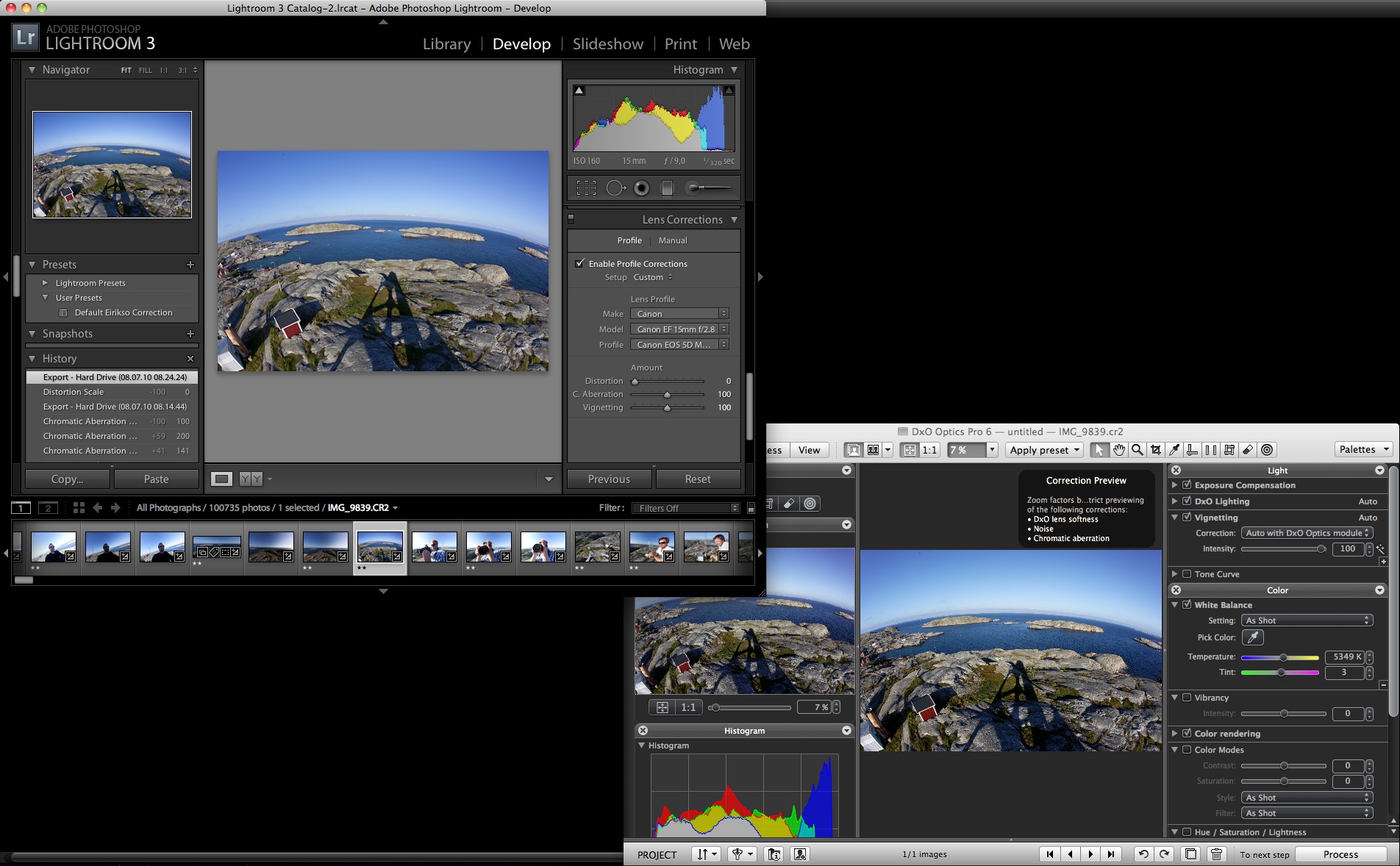
Fortunately the latest version of Lightroom have included lens correction. And my quick tests show that for me, I really don’t need DxO anymore. This is not a scientific test and I really, really hope that the DxO correction is way better than the Lightroom correction. Or, at least 299 Euro worth of pure quality… But for me, the benefits of using Lightroom exceeds the extra hassle and probably slightly better quality of DxO:

– Lightroom doesn’t have that stupid licensing system
– Lightroom is much faster
– Keeping all my work inside of Lightroom gives a much simpler workflow
– For me, the quality is good enough

Here is my quick test. Using a fisheye image shot with my Canon 5D Mark II and my Canon 15mm f2.8 fisheye:

Original image:

Defished with Lightroom:

Defished with DxO:

Comparison from a corner of the image. No defish but all lens corrections (click the image for full size):

DxO and their completely ridiculous licensing

Dear Canon, please opensource your firmware

Canon 5D Mark II Firmware Update from 1.0.6 to 1.0.7

I just updated the firmware on my new 5D Mark II. The firmware is the operating system in my camera. The software that decides how the menus on the screen should look, what the buttons do, and basically everything about how my camera handles the data from the CMOS that sits in there, collecting light when I snap images.

I didn’t get any extra functionality, but two issues that I never had problems with are now fixed.

Yes, it works fine. But we want more functionality. We want 25p and manual controls for video recording. And in this world of software it is possible for people to make that functionality. For you. For free. Either by hacking the whole camera. Or if you provided an API. Or even better, if you simply published the development tools and software.

Your revenue is based on selling excellent cameras and excellent lenses. And I guess Nikon and your other competitors have hacked and examined your firmware in detail already.

Open your firmware and you’ll see 25p on the 5D MkII before you can say “development kit”. And you’ll see all kinds of stuff that you and your competitors never thought of.

Update:
And you know what? People will improve the 5D Mark II firmware anyway. If you help them they will make better solutions.

You’ll be a pioneer. Bringing digital photography to the next level. Do it before your competitors!

I updated this article with a link to canonhack.com. After a hint from @urke.

And because I’ve made the links in this article pretty non-explaining I’ll repeat the link to CHDK as well! A very interesting project that already has enhanced the Canon firmware on a couple of cameras.

Dear Canon, please opensource your firmware

A brand new video channel!


YouTube and the other video sites out there making it extremely easy for you, me and your grandfather to publish videos on the internet are all cool, but the video quality is absolutely crap. For many of the videos that doesn’t matter much. You still get the message.

But sometimes you want better quality. You want to download the clip and play it locally on your computer. And you want this process to be easy.

Meet the Democracy Player from the Participatory Culture Foundation. It is an open soucre player and subscription engine. You add the video feeds you want and the Democracy Player downloads and manages the files. Just keep the player running in the background and you have interesting content available at all times. The Democracy Player even comes with a built in bittorrent client so it can download files from sites that have decided to use that type of distribution.

The Democracy Player is free, multi platform and open source. Works on Windows, Mac and Linux.

I have been following this project for quite some time and have tried the different beta versions of the player that they have made available. Recently they released version 0.9 and this is the first version that I can recommend everybody to download and start using.

It is easy to understand, has a nice channel guide and plays most video codecs. The only problem is that you will be overwhelmed with the amount of content. Huge amounts of complete crap and some pretty high quality stuff. Play around with the channel guide and you will find something you like.

You find geek classics like Diggnation, Rocketboom and Tiki Bar. You find Olde English Sketch Comedy, French Maid TV and MariposaHD. The last one in a no-so-high-definition but iPod friendly version.

But what’s the brand new channel? Well, the good people at the Participatory Culture Foundation has made a video publishing tool as well. Something like what WordPress does for blog publishing and Gallery does for image publishing. It’s called Broadcast Machine and is incredibly easy to use.

So, of course I have to try this out and give you the eirikso.com video channel. This is an experiment. I have started out by giving you some of the videos you already have seen here at eirikso.com in crappy YouTube quality. Now in much better quality for you to download. It would be very nice if you install the democracy player and try it out.

I would like to know

  • If the files that I have published through bittorrent works? (Touch Screen and Magnetic Fluid Art Installation)
  • If the file that is widows media is possible to play in the Democracy Player on Macintosh and Linux? (Four Seasons in Norway)
  • If the MPEG4 codec that was used for the last three videos plays OK and is a good idea as the standard format?

I will keep experimenting with this based on feedback from my readers. I have a theory that the type of videos that I have been publishing on the site here through YouTube and GoogleVideo is nice as illustrations to my articles and not so interesting as a full download. Something tells me that the content you want in the Democracy Player should be more complete and tell a story alone?

The Democracy Player is indeed interesting for bloggers and private publishers, but could also be interesting for professional media corporations.

Throw some comments here or contact me.

A brand new video channel!

Yahoodeeo – coming soon?

Screenshot of Yahoo TV

Edit, it’s official! From www.meedio.com, April 18, 2006:

Important News About Meedio

Today is a big day for the team here at Meedio; we have sold most of our technology to Yahoo!

David Brott, Jeff (beergeek), Kenny (fasttech), Pedro (flea0) and I are joining Yahoo!’s Digital Home team. We’ve had the opportunity to spend a lot of time with Yahoo! in the past few months and we love the way they are developing the best, most user-friendly services for the Digital Home.

Yahoo announced their Yahoo! GO – TV at CES in Las Vegas in January. I have been following some rumors about Yahoo buying Meedio. This could be interesting for the media center comunity. Yahoo buying such a powerful desktop application for presenting media on your TV will strengthen their position as a media distributor. And it actually makes sense. Why build it from scratch if you can buy a very good solution?

If you look at the screenshot from this page at Yahoo you’ll see that there is a “Flickr”-choice on the page. Cool. Seems like we can expect a tight integration into Flickr. Now when will Yahoo buy YouTube? Or when will we see a proper plugin for YouTube in Windows Media Center Edition?

Meedio is extremely powerful, fast and configurable. They also have some nice possibilities for advanced home control through HouseBot. If Yahoo buys it and throw some money on it you will have serious competition for some of the other platforms. The web is turning into a very good platform for delivering rich media like music and video. With podcasting and download services like TVTonic, Democracy and Akimbo you can start to deliver some high quality video as well.

Follow the rumors at the Meedio forum here, here and here. And they’re discussing over at HTPC News as well.

(Thanks, Trond A)

Yahoodeeo – coming soon?

ShowShifter is for sale

ShowShifter

One of the pioneers in the media center software market has shut down and are selling all their assets.

ShowShifter was one of the first true media center softwares out there. And the first package that I used in my living room. I still miss the usability of the Music Library in that package. They had truly excellent navigation and a very easy possibility to make playlists from the remote.

They also supported offline recompression at a very early stage and had a great user community making plugins and enhancing the product. They did some bad mistakes and was simply too late featuring a proper electronic program guide and support for hardware encoding cards.

Now you can buy the remains of the company, the source code and probably their database of users.

So if owning a mediacenter is not enough, buy yourself a complete company. Or you can support the best brains from the users. They would like to purchase Showshifter and make it into a project run by the community: Help save Showshifter!

ShowShifter

ShowShifter is for sale

Webcam screensaver for your media center

Matterhorn

Webcams are soooo last century. I remember how uttrly impressed we were when we back in 1995 discovered that a bunch of programmers at the University of Cambridge had placed a camera pointing at their coffee maker so they could keep an eye on the amount of coffee left while sitting in front of their computers one floor above.

Wow! We could actually see a live picture of the coffee machine at the University of Cambridge here in Norway. Big deal at that point. Not very interesting today. Like most webcams.

But, for some strange kind of reason it’s cool to have a screen saver on the media computer in the living room that gives a glimpse of the world. A screen saver that cycles trough a list of webcams that you can control yourself.

So, right now when I know that I am going to Zermatt for the weekend I have a nice live picture of the Matterhorn in addition to the mandatory pictures of Bergen and Paris. Not to forget the TullipCAM.

V-CamShow from Virdi software is free, flexible and works very well. It also has the very important feature that lets you name all cams and superimpose the name on the picture while cycling through the cams.

You need the direct link to the picture if you want to add a cam to your list in V-CamShow. Here are some cameras to start with:

(…and please add your favourite webcams to the comments here! Among others, I would really like a nice and frequently updated picture from a satellite… Anyone?)

Zermatt – Matterhorn
Webpage:
http://bergbahnen.zermatt.ch/d/web-cam/zermatt4.html
Direct link:

Paris, France – The Eiffel Tower
Webpage:
http://www.abcparislive.com/paris_webcam/eiffel_tower_webcams.htm
Direct link:
http://www.images1-abcparislive.com/eiffel2.jpg?1139513484641

Bergen, Norway – View from NHH
Webpage:
http://www.nhh.no/it/weather/
Direct link:

Voss, Norway – Hangursheisen
Webpage:
http://www.bt.no/kamera/
Direct link:

Devon, England – Tulip Cam
Webpage:
http://www.bbc.co.uk/devon/content/webcams/tulip_webcam.shtml
Direct link:

Webcam screensaver for your media center

The web page that eventually will show every picture possible

Everything possible

In May 2005 I posted an article that described an insane, yet slightly interesting supposition: Everything you would ever want to see

To put it short:
Make a computer program that renders all pictures possible within a given limitation. Store them on a hard drive and you would have a repository of all footage necessary to make any movie or TV show that will ever be made.

The article is one of my most popular so far. If you look through the comments you will find a lot of suggestions and attempts on making such a program.

Now, half a year later I have recieved the best one so far. Paul has made a page with a 64 x 64 greyscale frame. It is possible to create 2^1048576 pictures in that frame.

The frame will start with a black pixel up in the left corner and “count” up to the last picture as people visit the page. At some point something interesting will show up. A picture of the American president somewhere you have never seen him before. A picture of you somewhere you have never seen yourself before. Well, in a couple of million years everything possible will have been displayed at this page…

The web page that eventually will show every picture possible

Come on. Take it all. Do what you want!

NRK Online Spotlight meeNorway

So, what’s these two pictures? The one to the left is NRK’s official service for Windows Media Center Online Spotlight. The one to the right is a very unofficial NRK media center plugin for Meedio.

As mentioned in my post about Webshots and Flickr, one of the reasons why Flickr succeed is because they have a powerful open API. I have linked the acronym API to Wikipedia for the people that want to know more. The quick version: API is short for Application Programming Interface. It gives programmers a possibility to build new services on top of the service that provides an API. Google provides an API. In other words: people can build new services on top of Google. An example is the classic google fight.

Even without an API it is fairly easy to build new services on regular web pages. A plugin for Firefox called Greasemonkey puts this into a system with special scripts for adjusting and editing web pages as you visit them. Currently there are more than 400 000 scripts out there. Doing anything from removing the side bars of Slashdot.org to building advanced price comparing capabilities on Amazon.com. Wired magazine has an excellent article on Greasemonkey, explaining the details.

As the internet users get more advanced and the tools and programming languages become easier to use things like these happen. The BBC has experienced a lot of unauthorized remixing of their content and have been running around closing down web sites that is built on top of their news services and programme tables. Not anymore:
Continue reading “Come on. Take it all. Do what you want!”

Come on. Take it all. Do what you want!

The media center software list

A while ago I did a roundup of the different softwares I have been using in my HTPC. The list in that post is not complete, so I it’s time to put together a quick list of links to software alternatives when you want to build your own HTPC.

And if you are interested in HTPCs and media centers in general here is a good collection of links from eirikso.com.

Digg this story here.

Windows
Windows
Windows Media Center Edition
Windows Media Center Edition (Review)

TVedia
TVedia (Review)

ShowShifter
ShowShifter (RIP) (Unfortunately not existing anymore)


Beyond Media / Beyond TV (BeyondTV – Review)

Sage TV
SageTV (Review)

CTPVR
CTPvr

J River Media Center

MainLobby
MainLobby

MainLobby
Cyberlink PowerCinema

CQC
CQC (screenshots here and here)

Welltonway
Welltonway

Sesam TV
Sesam.tv (Free)

Nero Home
Nero Home

Intervideo
Intervideo WinDVD Media Center

nStantMedia
Nvidia Purevideo Decoder with nStantMedia

Sceneo TV-Central
Sceneo TV Central

Yahoo Go for TV
Yahoo! Go for TV (Formerly Meedio) (Free)
(MeedioTV – Review) (YahooGo – Preview)

Xlobby
Xlobby (Free)

GBPVR
GBPVR (Free)

Media Portal
MediaPortal (Free)

Got all media
Got All Media (Free)

GameEx
GameEx (Free)

Tvoon
Tvoon (Free)

Theatre@Home
Theatre@Home (Free)

MyTheatre
myTheatre

DVBViewer
DVBViewer


Linux
Linux

MythTV
MythTV (Free)

Sage TV
SageTV

Freevo
Freevo (Free)

GeeBox
GeexBox (Free)

VDR
VDR (Free)

My Media System
My Media System (Free)

LinuxMCE
LinuxMCE (Free)


Apple
Apple

FrontRow
Apple Front Row

xHub
xHub

EyeTV
Elgato EyeTV

Sage TV
SageTV (Review)

Center Stage
CenterStage (Free)

iTheatre
iTheatre (Free)

MediaCentral
MediaCentral

A very good collection of links for Apple media software (Thanks, Ole)


Xbox
Xbox

Xbox Media Center
Xbox Media Center (Free)


Windows Apple Linux
Cross plattform

Sage TV
SageTV (Review)

Oxylbox
OxylBox

Elisa Media Center
Elisa Media Center (Free)

And over here you’ll find a list in Wikipedia comparing features of some of the packages.

Please comment if I forgot something important!

…if you consider buying books or software related to this topic. And if you would like to support eirikso.com when buying them, here are some suggestions:
Creating a Digital Home Entertainment System with Windows Media Center Windows XP Media Center Edition 2004 PC for Dummies PC Magazine Guide Windows XP Media Center Edition 2005 Beyond TV 4 & Beyond Media Bundle Beyond TV 4

The media center software list

10 WinApps

As promised. The next post in my series of lists. Inspired by Om Malik’s 10macapps. My list of 10 very useful Windows Apps.

IrfanView
Fantastic tool for view, scale, convert and browse pictures. Includes a very fast and nice batch convert function.

VirtualDUB
The swiss army knife of video processing.

SuperEdi
Fast and powerful replacement for notepad

UltraVNC
IMHO the best remote desktop software out there.

ORB
Stream your media everywhere for free!

DVD Decrypter
Fast, simple and powerful DVD-ripping

AutoGK
The best and easy DVD recompression tool

AC3Filter
Free AC3 Filter for that 5.1 sound from your DVDs

ZoomPlayer
Extremely powerful and configurable media player

Total Commander
File explorer replacement. Ugly and very powerful. Handles archives and does batch copying in the background.

10 WinApps