A walk in the park

Help me!

I live close to the wonderful Vigeland sculpture park in Oslo. It’s the masterpiece of sculptor Gustav Vigeland and one of the biggest tourist attractions in Norway. It’s free to visit and open 24 hours a day.

When you live close to such an impressive place you start taking it for granted. While people come from the other side of the world and have an experience they will never forget I walk through the park on my way to work.

Statue2

The park includes 212 sculptures. Most of them showing people of different ages, moods and situations.

I have taken a lot of pictures of the statues, and through the year they change as the light, temperature and surroundings go through winter, spring, summer and autoumn.

During one of our many walks in this park my wife pointed out that it’s interesting to look at the people gazing at the statues.

Statue4

How they pose in front of them when taking pictures and how they behave when observing them.

So yesterday I brought my new Canon PowerShot S2 IS and snapped some pictures of the real people instead of the statues (more info and experience with the PowerShot in an article here later).

Less than half an hour and I had a lot of interesting images.
(Click the pictures to enlarge)

Sinnataggen

Comparing the facial expressions of the statues and the people…

Situation1 Situation2

Comparing situations in the park with situations in the sculptures…

Communication

Or starting to see communication between statue and photographer…

Posing

Or simply realizing some slightly amusing situations…

There have been some discussions around the fact that the statues mostly show the so called “Aryan” editions of our species. Who cares? When the park is filled with people this place resembles one of the most international and open places in Norway.

Photographer

Walking trhough the park on my way home after a late night in the city is of course a totally different experience than walking around with a lot of people in bright daylight. How people use the park during winter is of course totally different from how it is used during summer.

For those of you that want to comment on the individual pictures, see some additional ones or post your own pictures from this park I have made a Flickr Group with my images.

Living so close to the park I guess I’ll have to post back here as this little “The people of the Vigeland Sculpture Park” project evolves…

Statue

A walk in the park

Thomas Hawk reports from a dinner with Microsoft Exec Jim Allchin

WMP11

Thomas Hawk has been fortunate enough to be invited to a dinner with Microsoft Exec Jim Allchin and a couple of very interesting bloggers and technologists. As usual he reports with info, thoughts and some excellent pictures.
Not a 100% confirmation, but maybe we will be able to upgrade our Win XP media centers with WMP 11 and get better handling of large media collections?

I also talked with Jim about Windows Media Player. Last April I complained to Jim at our meeting about how slow Media Center handled large digital media libraries. This of course has more to do with Windows Media Player than anything. As I’ve reported previously, Jim also confirmed that we should expect to see dramatic performance improvements for large digital libraries in Vista and Windows Media Player 11 (can I get a “hot donkey” please!).

I also asked Jim if Microsoft would be releasing a standalone version of Windows Media Player 11 for people with XP and he said that they would. Although it may not have all of the features as the player shipped with Vista and although Vista is the priority right now, Jim said that we could expect an XP version of the popular player down the road as well.

Head over to ThomasHawk.com and read the rest. There are some updates and links to other discussions and blog posts at the end of his article.

(Screenshot of WMP11 from WinSuperSite.com)

Thomas Hawk reports from a dinner with Microsoft Exec Jim Allchin

I’m selling my old Canon PowerShot S20

PowerShot S20

And for the people that want to bid, it’s on QXL.no as soon as the auction is active. I’ll update this post with a direct link.

(You can click the picture of the camera here to get a better view.)

Update:
Here is the direct linkt to the auction: Canon PowerShot S20 (Norwegian!)

For the people that are not interested, feel free to read this post simply as a couple of very nice pictures…

Some quick specs:
Body: Aluminium / Magnesium alloy
Max resolution: 2048 x 1536
Low resolution: 1024 x 768 & 640 x 480
Image ratio w:h 4:3
CCD pixels 3.34 million (3.14 effective)

Here are some pictures taken with this reliable old camera:
(click the pictures for original versions)
Continue reading “I’m selling my old Canon PowerShot S20”

I’m selling my old Canon PowerShot S20

The iPod is now mounted in the car

iPod mounted in car

You find the brief introduction on how to connect an iPod to your car here. This is the short roundup:

1. Bought a Dension iceLink to connect the iPod to the factory mounted stereo in my 2001 Toyota Rav4.

2. 30 minutes of work to dismount the stereo and connect the iceLink

iPod mounted with Dension iceLink

3. Bought a ProClip mounting bracket from brodit.se

For Norwegians, find the bracket you want on brodit.se and call MobilData and order it. For a piece of plastic it is horribly expensive: NOK 299,-

For the people that have no clue about Norwegian Kroner – that’s about $44 for the mounting bracket(!)

That said, the bracket was easy to mount, fits well and holds my iPod in place. Unfortunately it has a very ugly kind of leather imitation surface. (Click the images for more detail).

4. Mounting the iceLink dock on the bracket. About 20 minutes of work.

5. Mounting the bracket in the car. Also about 20 minutes of work.

The iPod is now mounted in the car

Sudoku for MCE

MCE Sudoku

I don’t know how it is for the rest of the world, but in Norway there’s a complete Sudoku craze right now. A craze that’s so evident that I learned to hate Sudoku even before I had solved one single puzzle…

But for you Windows Media Center users out there that has joined the craze, this is good news. KMS Software has made a simple, yet excellent implementation of Sudoku. This is a game that is perfect for the TV screen and the remote control. Simply navigate with the arrow keys and enter numbers with the numeric keypad on the remote.

Sudoku

They have added a possibility to enter numbers as “maybe” to let you draft out as you play. They have also implemented the game so that it will remember your current puzzle until you start a new one. So, you can quit MCE, watch a movie etc. When you start Sudoku again it will present you with the last game you where working on.

I tried to install Sudoku on a computer running standard WinXP Pro and Meedio just to see if this game will work for non MCE users. No success so far.

KMS Software has a little collection of stuff for MCE and quite a bit coming up. Will be interesting to follow the popularity of small time killers like this one for MCE.

Sudoku for MCE

Presentation for The Norwegian Computer Society

As discussed in my post about presentation technique I try to make slides that only illustrates what I am talking about. If I hand out anything it is always done after the presentation, and it has to be more than the slides alone. People want some kind of summary, for internet stuff they want the links etc..

At the Norwegian Computer Society I talked about blogging and how I gain knowledge and valuable contacts through this activity. A bit about the relationship between my blog and my professional life and discussions around tools like Flickr, RSS Readers etc…

Top

This is a little experiment. I have written short summaries of what I was talking about for each slide and publish all of it here as a reference. Both for the people that attended the presentation and for the people that did not attend. It should be able to get some info out of this little post even for the people that missed the session this evening.

Maybe this could be a way to extend the discussion that was started during the presentation:
– Is it a good idea to try to define “blog” strictly?
– What RSS feed readers do you use?
– Do you have any special blogs to recommend?

My short answers. It’s difficult to define what a blog is in detail. Some of my thoughts are given in the presentation. As for feed readers I use Bloglines and Netvibes.

My recomended blogs are here:
10 essential blogs
The media center blogs
– The blogs that I subscribe to in Bloglines right now

So for the presentation. This is what you get if you save a powerpoint presentation as a web page. It is extremely ugly, but works. Still, you can also have a look at it here in the blog:
Continue reading “Presentation for The Norwegian Computer Society”

Presentation for The Norwegian Computer Society

Wonderful chocolates

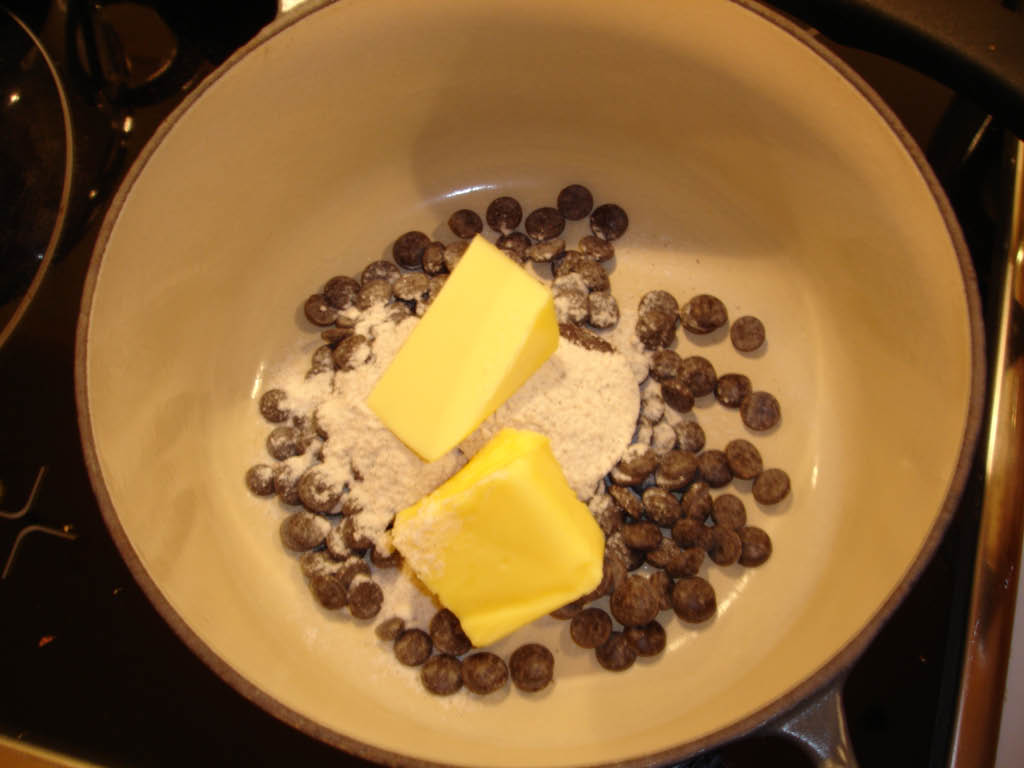
The recipe for one of my favourite chocolates. It’s ridiculously easy to make.

160 g chocolate (5.6 oz)
50 g butter (1.8 oz)
2 tbs honey

The chocolate should be of high quality and with 70% of cocoa. Depending on what honey you use the chocolate will get flavoured. Acacia honey is a delicate honey that just gives a sweet hint and leaves the rest to the chocolate…

Have all the ingredients in a pan and melt over very low heat. The best thing to do is to use a water bath. The chocolate can be destroyed in too high temperatures.

When melted this is a wonderful sauce for ice cream.

Pour the chocolate into moulds or in a slightly soft plastic box. Put in the refrigerator. When cold you can cut it in small shapes or remove from the moulds.

For the observant reader. In the picture at the top of this post there is no honey in the pan. I used 2 tbs of my own home made vanilla sugar. That’s another story and I guess I’ll have to be back with the recipe for that one as well…

Wonderful chocolates

The ultimate Apple remote control

More wishful thinking. More Apple rambling. And a description of the ultimate remote control. No doubt about it. I was disappointed in the remote control that Apple made for Front Row experience. For a second I was thrilled. Fantastic! A remote control with a scroll wheel! But no, it has six buttons. Period.

It looks like this:

Apple Remote

It’s IR. It’s one way. It has no screen. It has no scroll wheel.

Throw this away. Apple has already designed the ultimate remote. They only have to change some parts inside the iPod Nano.

In other words, the ultimate remote looks like this:

Apple iPod Nano

Remove all the memory. Remove the audio part. Throw in a bluetooth chip. Make a two way communication with Front Row Experience.

Voila. The coolest remote ever built. For listening to music from your Apple media box in your living room you don’t have to turn on the big screen. Just navigate with the remote and music plays from Front Row. When watching movies etc. you turn on the big screen. The LCD on the remote still gives you navigation info etc…

Then Apple makes an add on for the existing iPods. An accessory like the photo connector. A little something that you clip onto the bottom of your iPod Video or iPod Nano that turns it into a bluethooth remote for Front Row.

Dream on…

The ultimate Apple remote control

I’m presenting at The Norwegian Computer Society thursday 19th

dataforeningen

I am going to speak about blogging, sharing of knowledge, social networks and how a personal web site can be a professional tool as well.

The Norwegian Computer Society is the largest special interest society for information technology (IT) in Norway. It is an open, independent forum for Norway’s IT professionals and advanced IT users. The society encompasses the IT industry, corporations in general and research and development institutions. The NCS is an independent and wholly self-financed society with more than 10,500 registered members and more than 1,200 company members.

You can sign up for the event here (norwegian).

I’m presenting at The Norwegian Computer Society thursday 19th