One year in 90 seconds

Please digg this story here.

Link to the video in HD on YouTube.

If you like these videos then follow me on twitter: @eirikso – and you’ll be the first to know about other projects that I might do.

The story

All through 2008 I snapped still images from the same spot on my balcony to make a sort of time lapse video showing one year passing by. The video was hugely successful and has close to two million views on YouTube in addition to about one million on Vimeo and hundreds of thousands of views and downloads from other web sites.
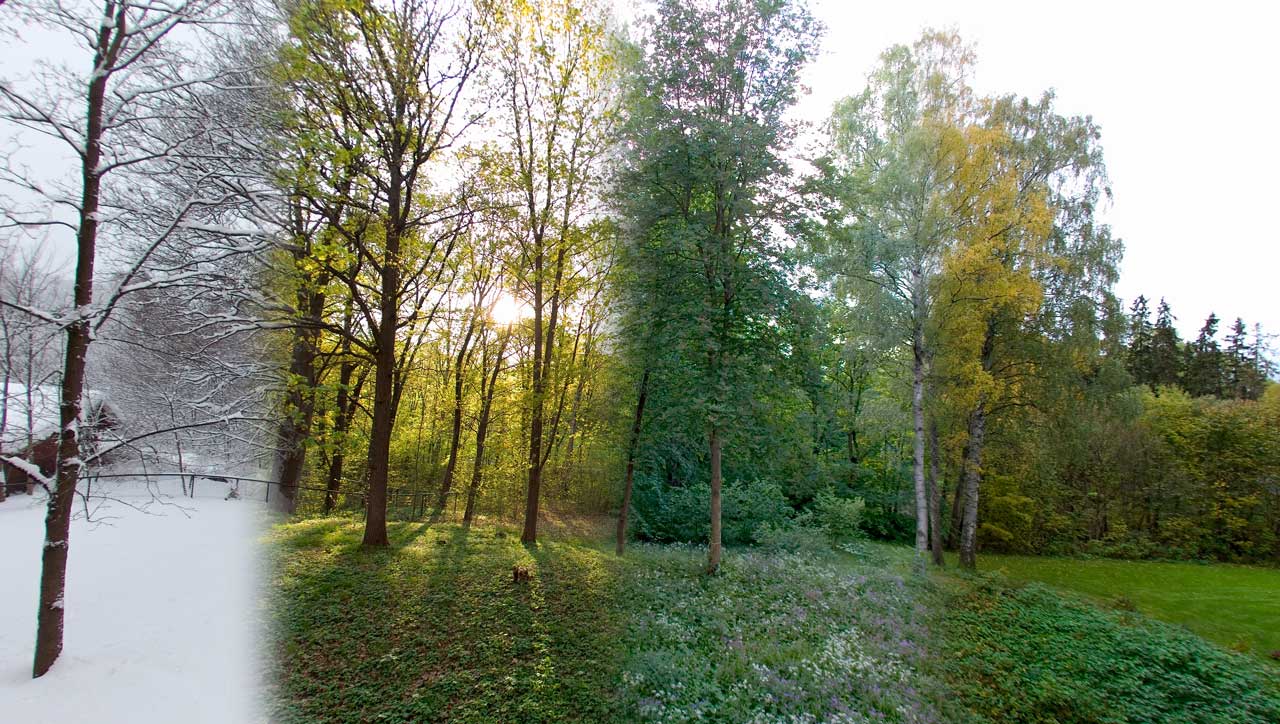
Last year I bought a new camera. The Canon 5D Mark II. In addition to excellent quality stills you can also shoot HD video with that camera. So I decided to do the same thing all over again. But this time I recorded 30 second video clips each time. My idea was that it would be possible to dissolve between the videos to get the same kind of time lapse effect, but this time with motion all the way. Snow falling, wind blowing etc.

2009 is over and I have now put all the clips I recorded through the year into a couple of videos.

I recorded clips with a 15mm fisheye, a 24mm wide angle and a 50mm lens. I’ve made three different versions. The first one is the one at the top of this article. Shot with the 15mm fisheye and “defished” using Fisheye Hemi in Photoshop. To do that I exported the video as an image sequence and did a batch job in Photoshop to run the fisheye hemi filter and some cropping.

The 50mm gives a closer look at the trees and I decided to make a longer video that gives a better view of how nature evolves with that footage. I ended up with 120 seconds.

Link to the video in HD on YouTube.

The last video is a version from the 24mm footage. That’s the short one. One year in 60 seconds…

Link to the video in HD on YouTube.

Download the full quality versions through BitTorrent:

All the videos are available on Mininova for download through BitTorrent in HD:

24 mm – One Year in 60 seconds (1280×720 30P)
15 mm – One Year in 90 seconds (1280×720 30P)
50 mm – One Year in 120 seconds (1280×720 30P)

How To-video (english) (1280×720 30P)
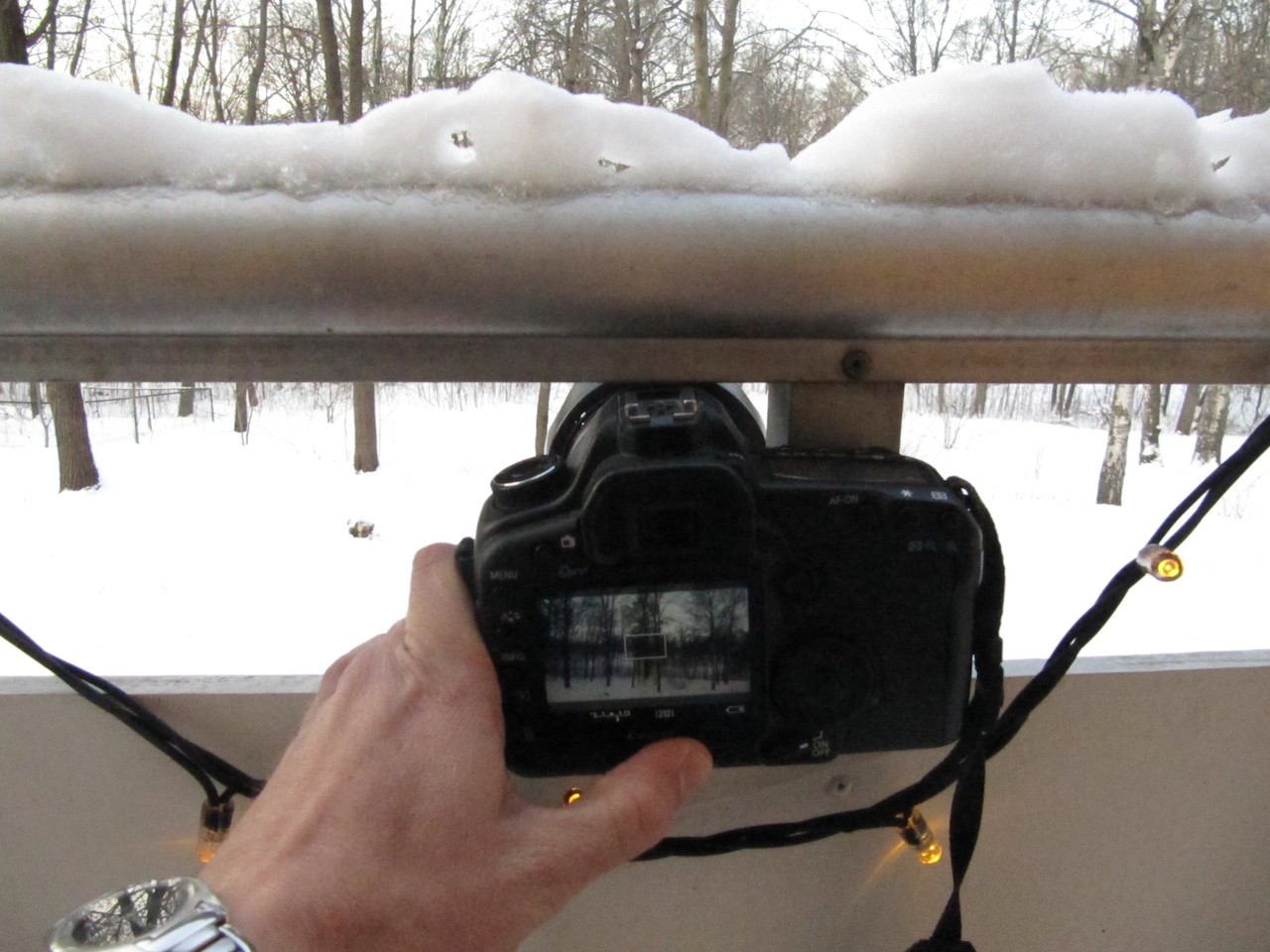
How did you do it?

The way I did it is actually quite simple. I found a spot on my balcony where I could place the camera in the exact same spot each time. Then I recorded video clips at irregular intervals. More or less once a week all thorugh 2009. More often during spring and autumn and not that often during summer and winter. All the videos are then put together using lots of dissolves.

It’s easier to explain the process in a video, so here it is:

Link to the video in HD on YouTube.

The audio

The sound was simply recorded with the Canon 5D Mark II as well. And left as it was recorded on all the clips in the video.

Can I use the videos in my projects?

Yes. All the videos are licensed with a Creative Commons License. To be exact: by attribution, share alike, non commercial.

Creative Commons License
This work by Eirik Solheim is licensed under a Creative Commons Attribution-Noncommercial-Share Alike 3.0 Norway License.

But what about commercial use?

If you want to use the video commercially I’ve decided to test a feature called Files Forever. At my hosting company, Dreamhost. You can buy a royalty-free, eirikso.com-bug free, totally clean full quality version of the file. It’s a ridiculous $99,- and the money will cover parts of my hosting fees for this website. Buy the files here:

One year in 60 seconds (24 mm)
One year in 90 seconds (15 mm)
One year in 120 seconds (50 mm)

Yeah. But I want to buy the original footage. The files directly from your 5D. I want to edit this myself. No problem. Please contact me at:
eirikso (at) eirikso (dot) com

Where was this filmed?

In Oslo, Norway

I don’t believe you, this is fake.

If you think the video was made in post production using fancy graphics software… Well, that’s your problem. Not mine.

I want to make something amazing from the raw clips

Contact me, and we’ll see what we can do.

I have other questions

Use the comments, so that I can answer to all the other people with the same questions.

…and by the way: if you’re into geocaching I’ve actually placed a cache in the area you see in the videos.

One year in 90 seconds

Visual thinking

I like to read and I like to write. But I have admit something. I’ve always tried to solve problems and explain complex issues by using images and visual aids. I love comics and I love photography. I try to follow Seth Godin’s rule of “no more than six words pr. slide” when making presentations. I try to tell myself: “don’t tell it, show it”.

I’m also deeply fascinated by physics and mathematics. The first thing I did when I learned to code was to make software that visualized the mathematical problems we tried to solve at school.

So I’m not surprised of the fact that I love data visualization and ways to show complex patterns and huge amounts of data visually.

And here are two of my best resources:

Information Aesthetics.

“Inspired by Lev Manovich’s definition of “information aesthetics”, this weblog explores the symbiotic relationship between creative design and the field of information visualization. More specifically, it collects projects that represent data or information in original or intriguing ways.”

3088127940_2d2aa0ab4e

An example from Information Aesthetics
An article about Open Street Map and a visualization of how people have edited the growing database of maps in their open and free to use database.

http://vimeo.com/moogaloop.swf?clip_id=2598878&server=vimeo.com&show_title=1&show_byline=1&show_portrait=0&color=01AAEA&fullscreen=1
OSM 2008: A Year of Edits from ItoWorld on Vimeo.

A wonderful visualization of the collective force behind a site like openstreetmap.

Flowingdata.com

FlowingData explores how designers, statisticians, and computer scientists are using data to understand ourselves better – mainly through data visualization.

what-i-want1

An example? How about “5 Best Data Visualization Projects of the Year“?

And of course. I can’t write anything about data visualization without mentioning Hans Rosling and his amazing presentations.

So what’s your favorite data visualization sites?

Visual thinking

Making miniatures of your images

Tilt-shift miniature faking has been around for a while. But I hadn’t seen Tiltshiftmaker before. And decided to give it a go. It’s a web site where you can upload an image or give it the URL of an image. Then it adds a simple blur effect and adjust the color to make the illusion of a miniature model. Works pretty good.

The miniature:
Quick test of tiltshiftmaker

The original:
IMG_6714

Pretty cool.

And by the way. The image is from Ljubljana in Slovenia. Fantastic city.

And if you want to do it with photoshop you can try one of the many tutorials out there.

Making miniatures of your images

Recommended reading

I’m currently working my way through these:

Clay Shirky, Here comes everybody. I’m only half way through, but this book is essential. A very nice analysis of how the crowds of the internet turns into well organized groups that can solve tasks that traditional organisations can’t solve.

Dan Roam, The back of the napkin. A very nice book on how to use visuals to explain complex stuff.

Garr Reynolds, Presentation Zen. Currently the best book about presentation skills out there. Period.

Recommended reading

Hybrid images

I’m at Siggraph 2006 and will try to post some of the stuff that I find interesting through the week. No particular order or focus. Just notes along the way during this highly interesting conference. You can read more about Siggraph over at the official ACM Siggraph site. To put it short, this annual conference is the world’s biggest conference on computer graphics and interactive techniques.

So for my first little note. I just finished a session by Dr. Aude Oliva, Antonio Torralba and Philippe G. Schyns. It was about what they call hybrid images.

Images that change based on the distance from where it is viewed. Have a look at the two pictures below:

Angry and nice
Pictures copyright © 1999-2006 Aude Oliva & Philippe G. Schyns. MIT

Now step away from your computer screen while looking at the pictures. Depending on the size of your screen and the quality of your vision the pictures will change at a certain distance. For those of you that is just too lazy to step away from the screen I can simulate this by simpy reducing the size of the image. This is a small version of the exact same image:

Nice and angry

Suggested uses are commercial billboards that change depending on the distance to the viewer. and fonts that can only be read at a close distance to avoid people reading “over your shoulder”.

You find more examples and information over at the GALLERY OF HYBRID IMAGES.

Hybrid images

Making a truly personal presentation

Hotel Croatia
At the EBU Connect conference earlier this month I experienced an excellent presentation by Patrick Damsted. It was a very good example of utilizing one of the most important advantages of doing a presentation. The fact that the presenter is there in person.

I have watched too many presentations where this advantage has been wasted. Presentations where a person goes on stage, reads through a bunch of bullet points and goes off stage.

Why bother? Why spend your money and time travelling to the venue at all? If you are there to read some bullet points I can give you some valuable advice: don’t go.

Email your bulletpoints to the audience and let them read through it themselves. It will be more efficient. People read faster than they speak. Even faster than you speak. You’ll save your money, your time, your jetlag and your disappointed family. Stay home.

Patrick Damsted
So what did Patrick do?
First of all, the good people organizing the conference was very clever at connecting the right people the day before the conference started.

Because I was talking about future technologies in general at day 1 and Patrick did a presentation on digital video recorders at day 2 we sat down and went through our presentations. I did some adjustmants and found some references where I could inform the audience that they would learn more in Patrick’s presentation the next day.

Patrick also did some adjustments. Actually, he did some serious adjustments…

So he goes on stage, introducing himself. Then he says something like this:

“After listening to some of the very interesting presentations yesterday I decided to throw away my original presentation and make a new one.

I skipped the party last night and went to my hotel room. There I made a new presentation and you’ll have to accept what I was able to make with my camera phone and my Mac.”

At that point he actually got a short round of applause from the audience.

Postcard
He starts his presentation, and a large part of the visuals are actually pictures taken in that hotel room.

Because most of the audience stay at the same hotel, have the same bag of office schwag and have the same conference programme in their hands we can know for sure that he made those slides right there at Hotel Croatia.

100 000 views
He used the traditional note papers from the hotel. Some postcards from the bag of conference sponsor goodies. The conference programme. Even the toilet paper in the hotel room. Of course he also kept some of his original slides in there, but the overall impression was of a truly personal presentation.

Tailored completely for that particular audience. Filled with references to the other presentations.

Because I had gone through his original presentation with him I could see that he had kept the main points, but by adjusting the presentation the way he did he really honoured the audience with a one of a kind, special act for those people, in that conference at that particular stage.

By doing that he made his own trip from Denmark and all the trips by the audience worth it.

And yes – without the excellent content, knowledge, confidence and general presentation skills this approach would not work at all. But that goes with all presentations. You should always start with hard research, practice and the ability to keep things simple. And of course, read Presentation Zen.

The Market is a conversation
Related stories:
How to avoid making boring presentations
How to make illustrations even if you can’t draw

Making a truly personal presentation

How to make illustrations even if you can’t draw

Make illustrations
I really hate clipart. So much that I at some point decided to start making my own illustrations for my documents, presentations and my blog.

Now I get all these nice compliments about my childish drawings. They seem to work well in my presentations because they add a personal touch. Doing presentations is a personal thing. The fact that you, yes you is there to present. People tend to appreciate the fact that you have spent the extra time adding your own special finish to the slides.

One little problem when I started was of course that I can’t draw. I made my own small cartoons at the age of 14 but has not done much drawing since then.

So when I started my experiments I immediately realized that my drawings where identical to the ones I made at the age of 14.

With some tricks in photoshop I was able to give these childish drawings a slightly more professional look, and after a while I am now able to make my own illustrations so fast that it can compete with the work I have to do if I want to find decent clipart.

The illustration in the example in this article took exactly 33 minutes from my decision to make something to finished illustration.

This is what you need:
1. Some courage to expose your unprofessional drawings
2. A black pen and some white paper
3. A digital camera or a scanner
4. Photoshop or Photoshop Elements

The idea
Start by trying to figure out the simplest possible illustration for the point you want to make. The fact that I can’t draw helps me a lot. It forces me to keep things simple. Not having the skill to make advanced illustrations is actually a good advantage when you want to make simple things.

Filt tip pen
The drawing
Use a thin pen. 0,75 or 1 mm. Have fun. The simple idea that comes to your mind first is often the best one when making illustrations like these. Don’t be afraid to break all rules about perspective, depth, proportions and whatever difficult guidelines that you could think of.

Don’t get scared by the fact that your drawing will look unprofessional before you start your magic in photoshop.

Draw with a firm line and close all open gaps.

Close all gaps
Closing the gaps is important for the work that you are going to do in photoshop.

Digitize it
Use a scanner, or a digital camera to get the illustration into your computer. If you use a digital camera you need an even lighting. Don’t use flash. Put your drawing near a window or under a soft light source. Using a digital camera will make the work in photoshop a bit more tricky, but with good lighting, a decent resolution and maybe a macro function on your camera it will do fine.

The photoshop work
First you want to separate your black lines from the white paper. Use the magic wand and select the white part of the picture. If you used a digital camera like I did in this example you might have to adjust the tolerance of the magic wand.

Selection
When you feel that you have a tolerance that selects the white part nicely you go to the “Select” menu in photoshop and choose “similar”. Photoshop will now select the parts of the white paper that was closed to your initial selection.

Now you have all the white areas selected. Go back to the “select” menu and choose Inverse. Now all your black lines are selected. Go to the edit menu and select copy. Then go back to the edit menu and select paste. (Or, Ctrl-C, Ctrl-V).

New layer
Now you should have a new layer with your drawing on a transparent background. Turn off the original layer with your photo or scan and start working on that new layer.

Here you use the magic wand to select the parts that you want to fill with color. The process is simple and quite repetitive. Select area, find your colors, select the gradient tool, choose a gradient type and apply the gradient.

Apply the gradient

If you want to add shadows or other effects you have to copy the part you want the effect on to a new layer.

Shadow

For this illustration I added a shadow on the person and some motion blur on the globe.

Shouting to the world
I have also had fun adding real photos or screenshots like the desert island in the TV and the screenshot from the Pirate Bay in the story about Bob the Millionaire. You find some more examples as well through this post.

Related story:
How to avoid making boring presentations

…and you can digg this story here.

How to make illustrations even if you can’t draw

How to ridicule a bandwidth thief

GudBedre
How a left wing blogger suddenly encourages people to vote right wing.

You have a shop and the store on the other side of the road puts up this beautiful poster in their window. You can’t afford such a nice poster but you get this great idea. You put a mirror in your own shop reflecting that particular beautiful poster from the other side.

This is a great idea until the shop on the other side change the poster to something that you really, really don’t want in your window.

Recently I went trough the raw traffic logs of eirikso.com. The logs from my hosting company that show all kinds of activity on my server.

This log will show me if anyone is stealing images and bandwidth from me.

Let me explain
If someone find a nice picture on your web site that they want to use on their own page they can do it in two different ways.

Stealing bandwidth
1. Include the picture in their page linking directly to the source picture on the original website. This gives the benefit of the fact that all bandwidth and storage space needed to show that stolen picture is eaten from the original owner of the picture. Meaning that the owner pay for the bandwidth used to show the picture on another site.

Every time someone ask for a page at the site that have stolen the picture it is loaded from the original servers.

Copying

2. Copy the picture to their own server and link to it there. Then they have to pay for the bandwidth and storage space themselves.

I have marked this blog with a creative commons license allowing non commercial use of everything here as long as you give me credit and stamp your new work with the same creative commons license.

I have also allowed some types of commercial use if it would drive traffic to my site in form of a link or an article.

But some people don’t care about that and use pictures from my site without asking and without linking back giving credit. Because they don’t know better or because they deliberately want to steal bandwidth. But that’s the nature of the internet. It’s how it work. Publishing something on the net gives other people quite a bit of control of your content.

But, when people steal images using method number one described above you have a way of getting your revenge. Yes, it sounds smart to let the place where you steal your images also pay for the bandwidth, but it is a seriously risky business.

You practically gives the original site total control of a window in your site. If I change the picture on my server it will also change on all the sites that have stolen it linking directly to me.

The picture of the TV
Currently, if you do an image search for “tv” in Google Images, a picture that I have made is number three of more than four million. Several people have stolen this and a lot of them link directly back to me. Giving me full control of that picture on their web page.

I have insane amounts of bandwidth available with Dreamhost so currently this problem is not very big. So for this picture I simply added “eirikso.com” to the picture to get a little attention on the sites that have used that picture.

Adding eirikso.com to the picture

Here are two examples. A page using my picture before and after. And another one before and after.

The political joke
But one case was just begging for a practical joke. I discover that a Norwegian blogger with a political very strong left wing message has used a picture of a glass of white wine from my blog. I am not voting extreme left, nor do I vote extreme right, but this case was screaming for some good old and very geeky fun.

So, right now there is a huge picture begging for people to vote right wing on this guys web site. On my server I exchanged the picture of the glass of white wine with a picture saying “Vote for FRP” with the logo of FRP (Fremskrittspartiet), the right wing party in Norway.

Fremskrittspartiet

The message here is a graphic that practically scream “Vote right wing!” in the middle of this left wing blogger’s web site. ROFL!

This is the link to his page. My joke has been there for a day or something. I guess he’ll change it soon, so here’s the screenshot.

The bottom line
If you enter this world of citizen journalism and utilize the fact that even your mother can have a web page on Blogger, please do your homework anyway.

Just like in the real world. If you go to Bangkok without doing any research at all you’ll probably get ripped off by a tuktuk driver pretty fast.

If you publish on the net without having any idea of what you are doing or who you are stealing from, then you’ll probably be victim of some arrogant geek fooling around with your site.

The side effect
This left wing blogger is not the only one using my picture of a glass of wine. So now a couple of other sites look pretty stupid as well. New York blogger Amanda is suddenly doing commercials for the Norwegian right wing party as well.

Personally I really don’t like this party, so as soon as this left wing Elvis Bling Laden guy fix his page and destroy my practical joke I will change this picture to something else.

Do you have any suggestions? Leave out the obvious offensive pictures that I could have put in there. I want to be more subtle than that.

Digg this story here.

How to ridicule a bandwidth thief