Yahoodeeo – coming soon?

Screenshot of Yahoo TV

Edit, it’s official! From www.meedio.com, April 18, 2006:

Important News About Meedio

Today is a big day for the team here at Meedio; we have sold most of our technology to Yahoo!

David Brott, Jeff (beergeek), Kenny (fasttech), Pedro (flea0) and I are joining Yahoo!’s Digital Home team. We’ve had the opportunity to spend a lot of time with Yahoo! in the past few months and we love the way they are developing the best, most user-friendly services for the Digital Home.

Yahoo announced their Yahoo! GO – TV at CES in Las Vegas in January. I have been following some rumors about Yahoo buying Meedio. This could be interesting for the media center comunity. Yahoo buying such a powerful desktop application for presenting media on your TV will strengthen their position as a media distributor. And it actually makes sense. Why build it from scratch if you can buy a very good solution?

If you look at the screenshot from this page at Yahoo you’ll see that there is a “Flickr”-choice on the page. Cool. Seems like we can expect a tight integration into Flickr. Now when will Yahoo buy YouTube? Or when will we see a proper plugin for YouTube in Windows Media Center Edition?

Meedio is extremely powerful, fast and configurable. They also have some nice possibilities for advanced home control through HouseBot. If Yahoo buys it and throw some money on it you will have serious competition for some of the other platforms. The web is turning into a very good platform for delivering rich media like music and video. With podcasting and download services like TVTonic, Democracy and Akimbo you can start to deliver some high quality video as well.

Follow the rumors at the Meedio forum here, here and here. And they’re discussing over at HTPC News as well.

(Thanks, Trond A)

Yahoodeeo – coming soon?

More on my Talkr podcast experiment

Thanks to some readers I have been made aware of the fact that the “Listen to this podcast“-link does not work for old posts in my blog.

The guys at Talkr have made a reasonably good job on trying to explain the problem when you click on a podcast-link in an old post:

We have encountered a problem with your request

Apologies, but we cannot find a post with the permalink:
http://www.eirikso.com/…this old post…

This often results from one of the following timing issues:

* If the RSS feed is generated by FeedBurner, it is possible that the post was published so recently that FeedBurner hasn’t found it yet. FeedBurner’s pretty fast, so if that’s the cause, this will probably be fixed within a few minutes.

* On the other hand, it is possible that you are requesting an audio file for an old article — one that was not present in this blogger’s RSS feed when they first created their Talkr account. In this case, Talkr has no way to create the audio. We’d like to apologize for this inconvenience.

Unfortunately I haven’t found a way to include the podcast link only on the posts that are working in Talkr. Of course all posts from now on will work, but my site has a lot of good articles way back in time, and people keep reading them as well.

Can’t say much more than what they do on the info page over at Talkr. I apologize for this inconvenience!

More on my Talkr podcast experiment

The Amen Break

Record

Pearse points me to an excellent little story about a very familiar drum beat:

You might also want to listen a great peice by Nate Harrison on the Amen break (you definitely have heard this, unless you’ve been living in a sound proof cave for years)
http://nkhstudio.com/pages/amen_mp4.html

It’s also a real nice example of bringing a great story alive in a simple yet compelling way.

Indeed! If you’re interested in music this is mandatory information. Thanks!

The Amen Break

Apple’s Intel ad gets a new ending

Because I just told you about the BSOD. Because I just tol you about BootCamp. Because I need to appologize to the important readers that follow this blog through RSS. Last thing first. The funny commercials from YouTube that I linked to in my last post did not show up in my RSS feed. Here are the plain links:

Volkswagen I
Volkswagen II
Volkswagen III
Berlitz

So that was the excuses to post another video. You have to be above average interested in computers, but I find this very funny:

(Via TUAW)

Apple’s Intel ad gets a new ending

Perfect adjustment of your LCD

Pixels on an LCD

When connecting my QPVision 37″ LCD to my media center through DVI I had no problems running the native resolution of 1366×768 on the screen. This gave me one-to-one pixel mapping and a completely sharp picture.

However, my friend Staale ran into some problems that seem to be quite common. He did some tests and created a simple and very effective test pattern that can help you find the right resolution.

It seems like quite a bit of LCD screens that has a resolution of 1366×768 report to the screen cards that the correct resolution is 1360×768. Seems like a small difference, but when you run 1360×768 on a screen that actually is 1366×768 the screen sometimes does a bit of scaling that makes parts of the picture slightly unfocused.

Here is an example. The first picture is taken as a super close up of the screen in 1360×768. The next one is the same area on the same screen forced to 1366×768 through the advanced settings in the screen card driver:

Screenshot of resolution 1360x768 Screenshot of resolution 1366x768

And here is a detail of those images:

Detail of 1360x768 Detail of 1366x768

The difference seems big here, but it can be difficult to detect and that is where Staale’s brilliant test pattern comes in. It is a simple grid of black and white pixels that will clearly reveal a screen that is not mapped one-to-one. You can download the image here:

GIF (3 k)
PNG (4 k)
BMP (1,2 MB)

It should never be converted to a JPG. Any lossy compression will destroy the file.

Download it and insert it as your desktop pattern. Centered and not streched.

If your screen looks like this:

Screenshot of a perfect resolution

…then you have a perfect one-to-one pixel mapping.

If it looks like this:

Screenshot of problem with the pixel mapping

…then you have a problem with your pixel mapping.

Unfortunately it can be difficult to solve the problem. It depends on the screen, your screen card, the firmware in the screen, your screen card drivers, the software you use etc… It involves advanced tools and might even put you into serious trouble with your screen and the image from your computer.

For relatively new Nvidia screen cards and drivers you have options to take complete control of the refresh rates and resolution to the screen. You can also try playing around with PowerStrip. Or, use AVS Forum. An excellent source of information on advanced use of media equipment.

Digg this story here.

And please feel free to comment if you have solutions to this problem for specific setups.

Perfect adjustment of your LCD

Cool easter egg in an audio CD

Waveform displaying an image from audio

Apparently it is old news and was hot in the late nineties. I haven’t seen it before, and having worked as a sound designer I find this fascinating.

Aphex Twin has hidden an image of himself in the audio waveform of track 2 on Windowlicker. You need some software to find it and display it.

That’s what I call a cool easter egg on an audio CD. You know, like the easter eggs found in software, on DVDs and in movies. If you want to try this on your own productions here is a windows software that can help you out. Or you can use the Mac software that Apex Twin used to create the image above.

I haven’t found any cool examples of people doing the opposite, hiding audio in an image, but if you want to start implementing all kinds of data into other files you could try one of the following: Hide and Encrypt or Hider 1.1 (Both of them for Windows)

(Via Between Thought and Expression)

Cool easter egg in an audio CD

It’s official. My next laptop will be a MacBook Pro

Apple Logo

Yes, it has a stupid name, but it is the fastest most sexy windows laptop you can get. And now Apple has made it easy to install both OS X and WinXP on it. How cool is that? OMG they’re going to be short of MacBooks for months!

…and how about that MacMini running Meedio Pro, BeyondTV and MediaPortal?

Of course when Apple finish their FrontRow software that will be the best solution, but we want a small, silent and good looking media computer with PVR functionallity now! And a MacMini with the mentioned software and two external Hauppauge PVR-USB2 might do the trick.

It’s official. My next laptop will be a MacBook Pro

Listen to eirikso.com

Illustration - Loudspeaker

Screenshot of Talkr button

Erling Sivertsen points me to Talkr. A service that can give you a computer generated audio version of RSS-feeds. From now on you will find a nice little button in my side bar that says “Talkr”. Copy the link from that button into your podcacher (iTunes or Juice or whatever), and you can start listening to eirikso.com. I don’t think eirikso.com is the best blog to listen to because I try my best to include visuals in addition to the text. Photos and illustrations. Still this is a cool service and could be very valuable for people with limited vision etc.

Screenshot of link- Listen to this

You will also find a little link at the end of all articles saying “Listen to this podcast”. Click it, and your browser will start reading the post for you.
And if you want to listen to a blog that has no “Talkr”-button, you can sign up for a free account with Talkr and add up to three RSS-feeds for your own. They also have a paid service that let you add more feeds. Quickly clicking around at the help pages did not give me any information about what languages they support. My guess is that the service at this point only support English feeds.

…and a small note about the name – “Talkr”. Please guys! Just because Flickr spelled their name in a cool way that is impossible to pronounce you don’t have to do the same. Throwing in an “r” in the end of your name does not mean that VCs will run for the money.

Listen to eirikso.com

How to make a cool chair for your kids

Finished chair

I made one of these two years ago, but I need one more. Of course I didn’t find my original drawing and had to use the old one as a basis for my measures. Now I am posting this here for future reference.

The tools

The Tools

What you need

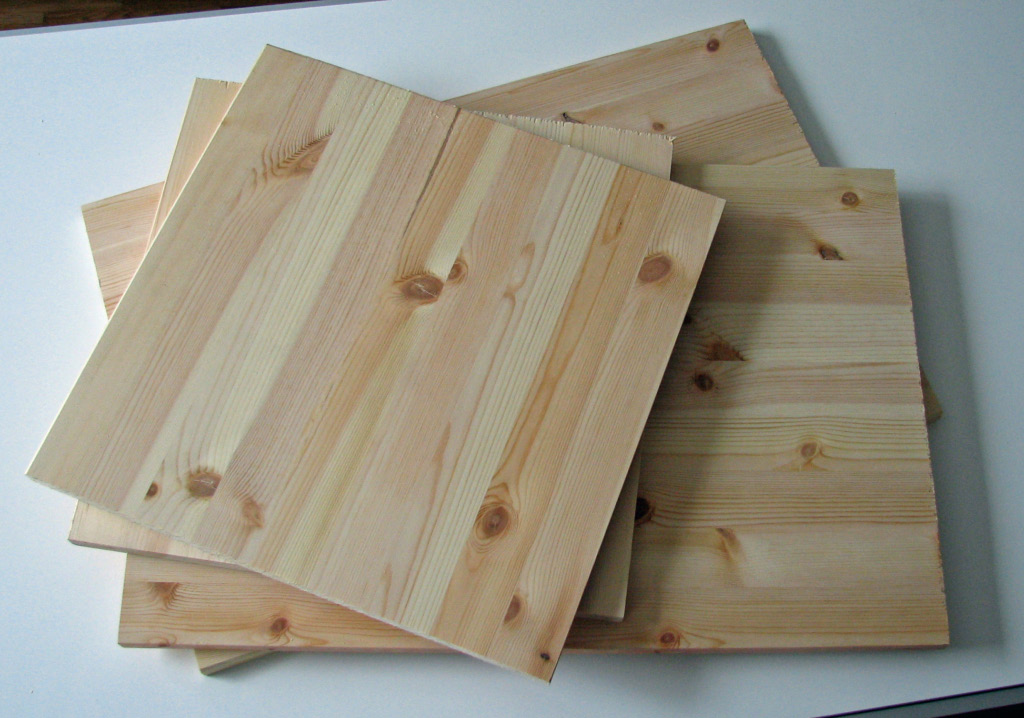
Wooden Plates
Angle brackets

2 wooden plates of 40 x 40 cm
2 wooden plates of 60 x 40 cm
8 angle backets

I used two plates of 120 x 40 cm. One cut in two parts and one cut in three parts.
Continue reading “How to make a cool chair for your kids”

How to make a cool chair for your kids