Perfect adjustment of your LCD

Pixels on an LCD

When connecting my QPVision 37″ LCD to my media center through DVI I had no problems running the native resolution of 1366×768 on the screen. This gave me one-to-one pixel mapping and a completely sharp picture.

However, my friend Staale ran into some problems that seem to be quite common. He did some tests and created a simple and very effective test pattern that can help you find the right resolution.

It seems like quite a bit of LCD screens that has a resolution of 1366×768 report to the screen cards that the correct resolution is 1360×768. Seems like a small difference, but when you run 1360×768 on a screen that actually is 1366×768 the screen sometimes does a bit of scaling that makes parts of the picture slightly unfocused.

Here is an example. The first picture is taken as a super close up of the screen in 1360×768. The next one is the same area on the same screen forced to 1366×768 through the advanced settings in the screen card driver:

Screenshot of resolution 1360x768 Screenshot of resolution 1366x768

And here is a detail of those images:

Detail of 1360x768 Detail of 1366x768

The difference seems big here, but it can be difficult to detect and that is where Staale’s brilliant test pattern comes in. It is a simple grid of black and white pixels that will clearly reveal a screen that is not mapped one-to-one. You can download the image here:

GIF (3 k)
PNG (4 k)
BMP (1,2 MB)

It should never be converted to a JPG. Any lossy compression will destroy the file.

Download it and insert it as your desktop pattern. Centered and not streched.

If your screen looks like this:

Screenshot of a perfect resolution

…then you have a perfect one-to-one pixel mapping.

If it looks like this:

Screenshot of problem with the pixel mapping

…then you have a problem with your pixel mapping.

Unfortunately it can be difficult to solve the problem. It depends on the screen, your screen card, the firmware in the screen, your screen card drivers, the software you use etc… It involves advanced tools and might even put you into serious trouble with your screen and the image from your computer.

For relatively new Nvidia screen cards and drivers you have options to take complete control of the refresh rates and resolution to the screen. You can also try playing around with PowerStrip. Or, use AVS Forum. An excellent source of information on advanced use of media equipment.

Digg this story here.

And please feel free to comment if you have solutions to this problem for specific setups.

Perfect adjustment of your LCD

Cool easter egg in an audio CD

Waveform displaying an image from audio

Apparently it is old news and was hot in the late nineties. I haven’t seen it before, and having worked as a sound designer I find this fascinating.

Aphex Twin has hidden an image of himself in the audio waveform of track 2 on Windowlicker. You need some software to find it and display it.

That’s what I call a cool easter egg on an audio CD. You know, like the easter eggs found in software, on DVDs and in movies. If you want to try this on your own productions here is a windows software that can help you out. Or you can use the Mac software that Apex Twin used to create the image above.

I haven’t found any cool examples of people doing the opposite, hiding audio in an image, but if you want to start implementing all kinds of data into other files you could try one of the following: Hide and Encrypt or Hider 1.1 (Both of them for Windows)

(Via Between Thought and Expression)

Cool easter egg in an audio CD

It’s official. My next laptop will be a MacBook Pro

Apple Logo

Yes, it has a stupid name, but it is the fastest most sexy windows laptop you can get. And now Apple has made it easy to install both OS X and WinXP on it. How cool is that? OMG they’re going to be short of MacBooks for months!

…and how about that MacMini running Meedio Pro, BeyondTV and MediaPortal?

Of course when Apple finish their FrontRow software that will be the best solution, but we want a small, silent and good looking media computer with PVR functionallity now! And a MacMini with the mentioned software and two external Hauppauge PVR-USB2 might do the trick.

It’s official. My next laptop will be a MacBook Pro

Listen to eirikso.com

Illustration - Loudspeaker

Screenshot of Talkr button

Erling Sivertsen points me to Talkr. A service that can give you a computer generated audio version of RSS-feeds. From now on you will find a nice little button in my side bar that says “Talkr”. Copy the link from that button into your podcacher (iTunes or Juice or whatever), and you can start listening to eirikso.com. I don’t think eirikso.com is the best blog to listen to because I try my best to include visuals in addition to the text. Photos and illustrations. Still this is a cool service and could be very valuable for people with limited vision etc.

Screenshot of link- Listen to this

You will also find a little link at the end of all articles saying “Listen to this podcast”. Click it, and your browser will start reading the post for you.
And if you want to listen to a blog that has no “Talkr”-button, you can sign up for a free account with Talkr and add up to three RSS-feeds for your own. They also have a paid service that let you add more feeds. Quickly clicking around at the help pages did not give me any information about what languages they support. My guess is that the service at this point only support English feeds.

…and a small note about the name – “Talkr”. Please guys! Just because Flickr spelled their name in a cool way that is impossible to pronounce you don’t have to do the same. Throwing in an “r” in the end of your name does not mean that VCs will run for the money.

Listen to eirikso.com

How to make a cool chair for your kids

Finished chair

I made one of these two years ago, but I need one more. Of course I didn’t find my original drawing and had to use the old one as a basis for my measures. Now I am posting this here for future reference.

The tools

The Tools

What you need

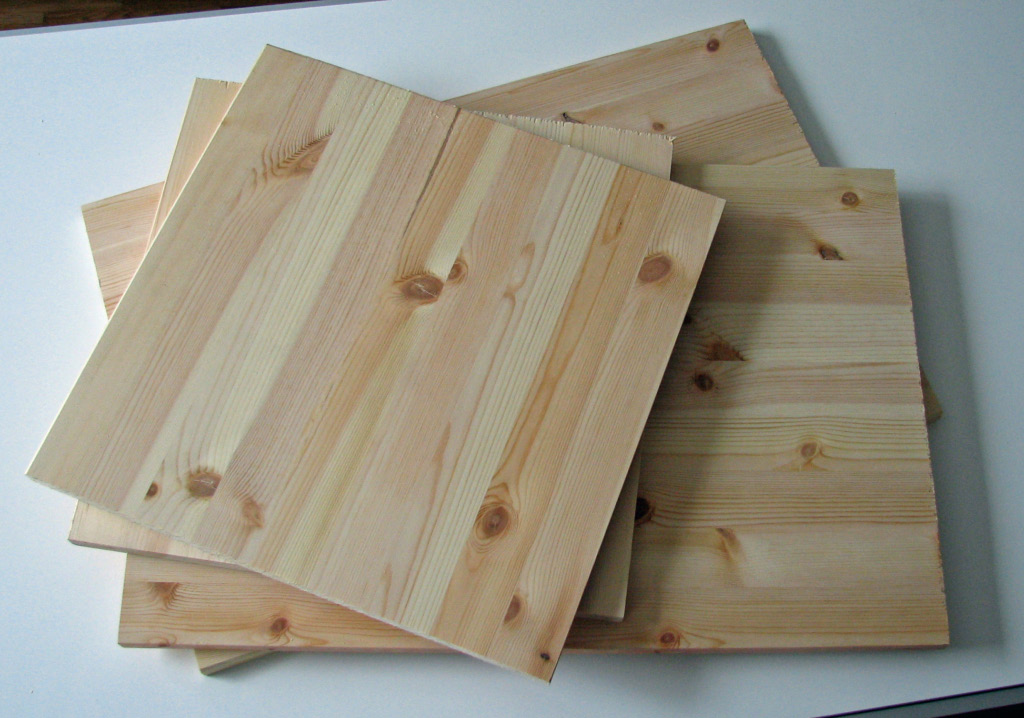
Wooden Plates
Angle brackets

2 wooden plates of 40 x 40 cm
2 wooden plates of 60 x 40 cm
8 angle backets

I used two plates of 120 x 40 cm. One cut in two parts and one cut in three parts.
Continue reading “How to make a cool chair for your kids”

How to make a cool chair for your kids

ROFL! The n00b got a BSOD on his HTPC

BSOD HTPC

Or in plain english:
Rolling on the floor lauging! The inexperienced user got a serious error on his home theatre personal computer.

People keeps asking. And a while ago I realised that my mother is reading this blog. She wasn’t the one requesting this little roundup of strange computer geek language but I have a feeling that she will be one of the persons learning a couple of new abbreviations from this article.

There is no point for me to give something of a complete guide to internet language. I’ll explain a couple of the abbreviations I have used here on eirikso.com and lead you to some excellent recources in the end of this article. Here we go:

HTPC – Home Theatre PC. A computer that is tailored for media playback. Very often built to stay in the living room besides amplifiers, DVD players, VHS players and other audio and video equipment. And, regarding the DVD players and VHS players the HTPC is very often replacing them, not sitting there besides them.

IMHO – In My Humble Opinion

LOL – Laughing Out Loud

ROFL – Rolling on the floor laughing (laughing even more than when you laugh out loud)

BSOD – Blue Screen Of Death. The blue screen that a Windows computer will give you when something goes seriously wrong. Usually the most horrible error message of them all. Very often connected to complete hardware failures.

NSFW – Not Safe For Work. “This link is NSFW“. Used to indicate that the content might be offensive. So far the closest thing you get to something that is NSFW on eirikso.com would be this. (…ouch. Did I mention that my mother reads this blog?)

WTF? – What the fuck? Hmm. Maybe one of the words there is NSFW?

w00t! – Something like WOW!, Fantastic!, Yippeeee! Difficult to translate directly, and a part of the very advanced l33t-language. Read the complete explanation of w00t here. Yes, you write w00t using the number zero instead of the letter “o” and l33t using the number three instead of “e”.

OMG – Oh My God

n00b – Newbie. An inexperienced user. “I am a n00b, please be gentle.

RTFM – Read The Fucking Manual. If you ask a very stupid question in a forum you sometimes could get a simple RTFM as the answer.

The list goes on. You find one of the most complete lists of internet slang on Wikipedia. Together with the Urban Dictionary you should be covered.

And yes, the fact that my retired mother actually reads this makes me proud of her. 🙂 …problem is that before I know it she’ll start commenting on my bad english.

ROFL! The n00b got a BSOD on his HTPC

Usability and error messages

The Bloglines Plumber

I’m using Bloglines as my RSS reader. I like the fact that it is independent of the computer I use and that it lets me keep a list of clips and a blog of links that I can follow up later.

Today when I tried to access it the site was down for maintenance. Bloglines seem to have systems that let them maintain and keep the service running without having to take it down often, but today they apparently had to take it down for a short while.

What kind of message they give to their users while the system is down is an important part of their communication with their users. And I admit it. I am used to such horrible messages of “Error-whatever-please-come-back-later” that I actually get charmed by messages like this one:

Hi,

I’m the Bloglines Plumber. Bloglines is down for a little fixer upper. We will be back shortly. Bloglines will be all better when I’m done with it.

Thanks,
The Bloglines Plumber

The result of such a communication? Well, the downtime doesn’t bother me at all. Simple as that.

Usability and error messages

Experimenting with Lightbox for WordPress

Most of the pictures in this blog are thumbnails with a bigger version of the picture behind it. If you click the picture it will simply open the large version in a blank page.

There is a nice java script based plugin for WordPress that gives a bit of extra functionallity for pictures. When you click a thumbnail the bigger version will open on top of the same page with the rest of the page “dimmed”.

The question is: what do you think?
Leave a comment here if you have any thoughts…

The plugin seems to automatically work on all pictures in this blog. Click around and have a look. Should I leave it on, or would you like the good old “open-the-picture-in-a-blank-page”…?

You can try it here by clicking on one of these images (you can simply click it again to close it):

Matterhorn and a plane 3883 meters above sea level

Some info about the images. Taken above Zermatt, Switzerland. With a Canon S2 IS.

The one to the left is the top of Matterhorn. Snapped at the right moment when a plane passed by. The one to the right is at the top of Rothorn. 3883 meters above sea level. Move slowly…

Experimenting with Lightbox for WordPress

How to waste your company’s money and make an utterly stupid audio format

SACD

1. Be careful about timing.
Find an exact point when the majority of the users of existing formats are willing to change their habit. Around 1999 something happened to the way people wanted to consume music.

2. Analyze what this change is all about.
At this point people clearly moved towards more availability and was actually willing to sacrifice quality for the availability. Uncompressed audio was compressed and moved quickly between devices. Welcome MP3, Napster, iPod etc…

3. Now plan a format that is exactly the oposite of what people want
Welcome Super Audio CD (SACD). It was released in 1999. Most of you haven’t even heard about it. It is a very high quality audio format that is so insanely well protected that it won’t play on any of your existing devices.

It’s five channels but it won’t play on your new five channel home theatre. It’s digital but it won’t play on your new media center PC. Or Mac. Or Linux box.

This is just as stupid as it would be to launch a digital version of the good old Compact Cassette at the point when people got used to portable CD players and the professionals that wanted recording capabilities already had the high quality DAT system.

Oh. Wait. Someone did exactly that.

Or failing to understand that a special little disk with very low storage capabilities is not the way to go when people are used to carrying around their complete music library. Eh. Someone did that too

How to waste your company’s money and make an utterly stupid audio format

Sesam.no just got some cheap ad-space

MykleSesam

My friend Mykle just sold his MSN Display Picture for $122,50. The lucky winner of the auction on eBay was Norwegian search engine Sesam.no

Now, every time Mykle logs on MSN messenger the logo of Sesam.no shows up above all windows on about 50 computers automatically.

Every time Mykle chats with someone the logo of Sesam.no will be there loud and clear stating that “Mykle supports Sesam.no – better search”.

At $122 that’s a bargain if you ask me.

Sesam.no just got some cheap ad-space